Key Takeaways
- A fast and reliable website depends on the hosting environment and stack you choose, because they control how efficiently your site runs and how well it handles traffic.
- With a traditional VPS, you get a customizable environment that can support almost any type of application, along with deep system-level access so you can configure the server, tune performance, and manage everything exactly the way you prefer.
- Managed hosting blends powerful cloud infrastructure with managed application stacks, giving you UI driven scaling, built-in caching, automated backups, security, and proactive monitoring so day-to-day server management feels much lighter.
When it comes to your website’s performance, speed isn’t just nice to have; it’s everything. We’ve all clicked away from a slow-loading page before, right? Even a single-second delay can cost you visitors, sales, and real revenue. That’s why the “Managed hosting vs VPS” debate isn’t just about hosting; it’s about which stack keeps your website lightning fast and hassle-free.
As your site grows, performance issues, downtime, and constant tweaks can quickly turn into business headaches. Many people start with a traditional VPS for the flexibility it offers, but soon realize it comes with ongoing maintenance, updates, and optimization work that drains time and energy.
Most of the managed hosting providers take a smarter approach, delivering the best of cloud hosting without all the heavy lifting. You get consistent speed, built-in scalability, and more time to focus on building your brand and growing your audience.
Overview of Traditional VPS and Managed Hosting Stack
Now let us look into the web hosting stack provided by VPS vs Managed hosting. Here we are taking up Cloudways as an example of a managed hosting provider. In this guide, we break down the Cloudways stack vs VPS differences so you can choose the better platform for a fast website that can keep up as your traffic and business grow.
Traditional VPS hosting and managed hosting run on two very different stacks, and those differences play a big role in how your applications are deployed, managed, and optimized as your site grows.
To really see what sets them apart, let’s take a closer look at each platform from the underlying infrastructure to the application layer. The next sections walk you through the key components of a traditional VPS stack and the managed hosting stack.
Traditional VPS Hosting Stack
Traditional VPS (Virtual Private Server) hosting is built for people who like having full control over their hosting setup. It runs on a layered architecture that gives you complete freedom to customize everything to your liking.
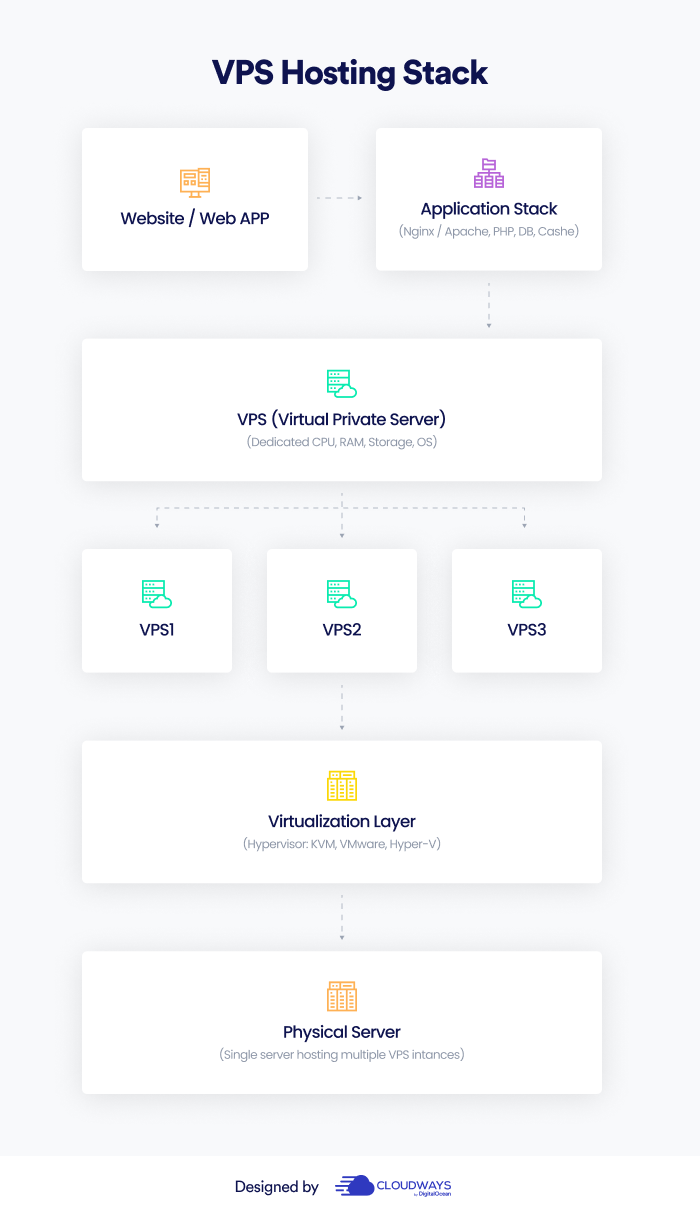
- VPS Hosting Stack
At the top of the stack are your websites or web applications, accessed by visitors through web browsers or mobile devices.
With a traditional VPS, you are responsible for building the entire application stack. This includes selecting and installing the web server, such as Apache or NGINX, configuring the runtime environment, setting up databases, and adding caching or performance optimization tools. This flexibility allows you to tailor the stack to specific use cases, but it also requires technical expertise and ongoing maintenance.
The VPS provides an isolated virtual environment with dedicated CPU, RAM, storage, and operating system resources. Within this environment, you can host one or multiple websites or applications based on your requirements and available resources. Many users choose to host multiple websites or applications on a single VPS to save costs.
Behind the scenes, virtualization technology divides powerful physical servers into multiple VPS instances, efficiently allocating resources while keeping each environment isolated. The underlying hardware supplies the compute, storage, and networking that power the entire hosting stack.
This architecture gives you deep system-level control, from the operating system to the application layer. However, scaling, security hardening, monitoring, backups, and performance tuning are all handled manually. While powerful, this approach demands time, expertise, and continuous attention to keep performance optimized.
Managed Hosting Stack
Cloudways delivers a fully managed cloud hosting experience that’s all about high performance without the headaches of manual server management.
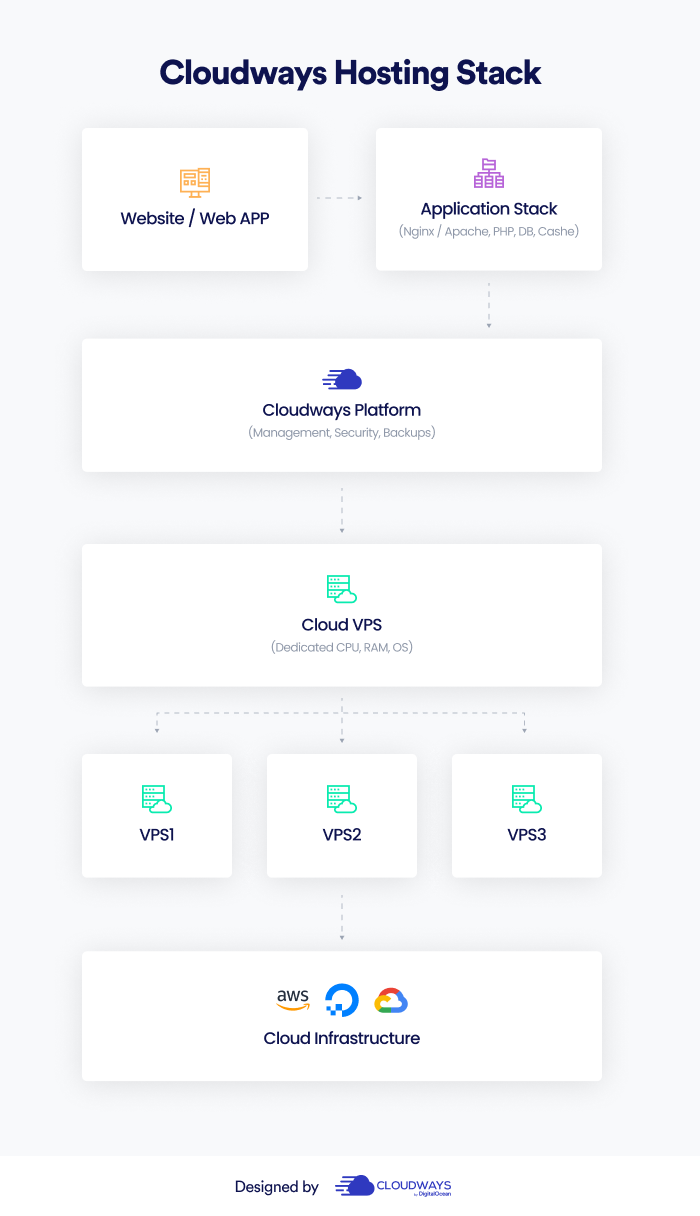
- Cloudways Hosting Stack
At the top of the stack are your websites and web applications, running on a pre-configured application stack that’s fine-tuned for speed, security, and compatibility right out of the box.
Just beneath that is the Cloudways platform itself, where all the heavy lifting happens. It takes care of the behind-the-scenes tasks like server provisioning, software updates, security hardening, automated backups, monitoring, and performance optimization. Instead of dealing with server settings, you can focus on what truly matters: building, managing, and growing your applications.
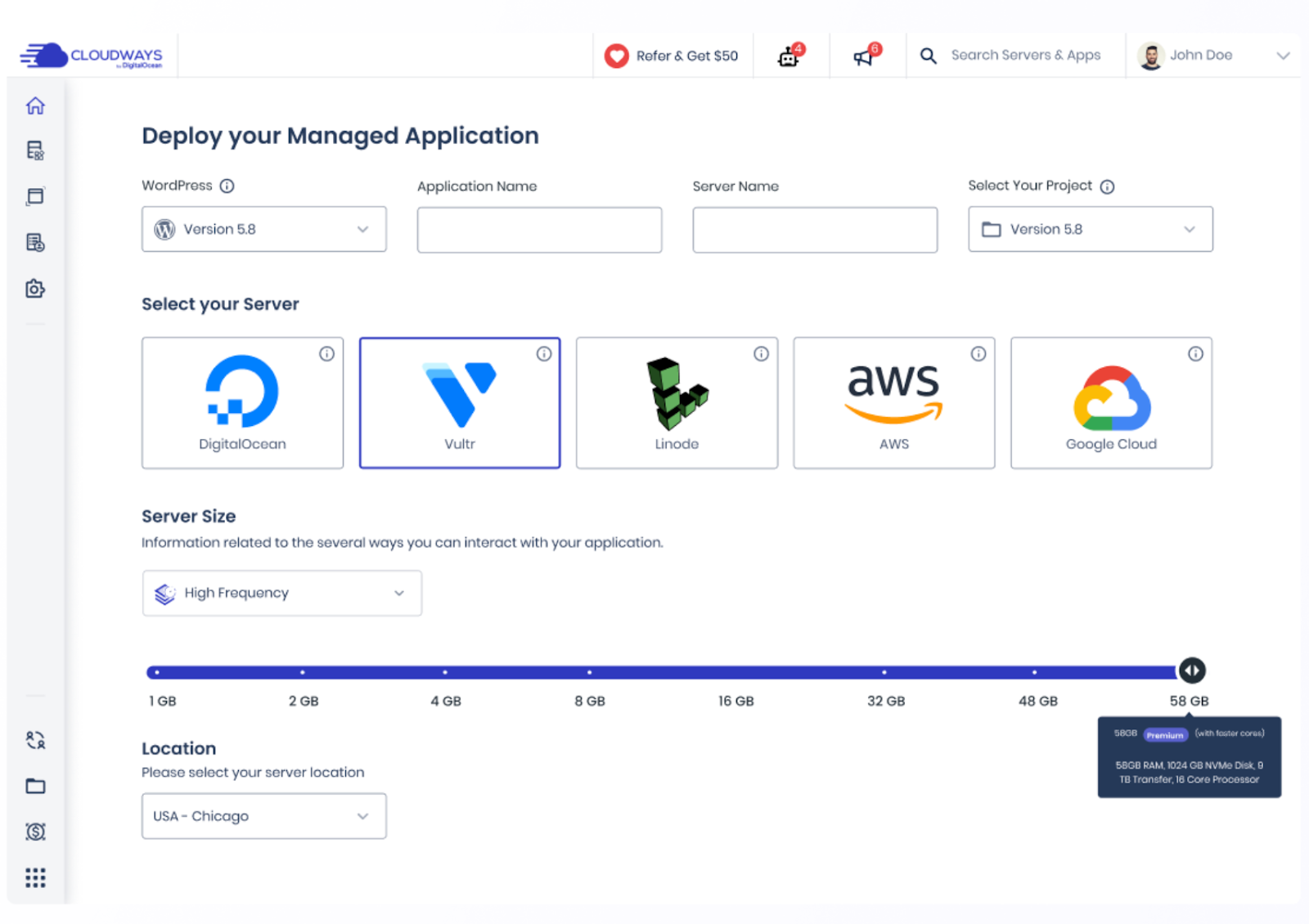
On Cloudways, you provision a cloud server rather than a single application environment. You can then host multiple applications such as WordPress, Magento, or Laravel on that single server. These applications share the CPU, RAM, storage, and other resources of that same server. The server itself is isolated, and the applications sit on that server. This isolation helps deliver consistent and reliable performance by minimizing resource contention.
Powering all of this is top-tier cloud infrastructure from providers like AWS, DigitalOcean, Google Cloud, Linode, and Vultr. With data centers all over the world, you can choose the server location that keeps your site closest to your users while benefiting from scalability, redundancy, and uptime reliability.
In short, Cloudways brings together the power of leading cloud infrastructure with the convenience of a managed platform. You get the speed and scalability of the cloud without the stress of managing it yourself. Also offered is the free migration plugin for WordPress websites to easily shift your site to the managed cloud platform.
Cloudways Application Stacks
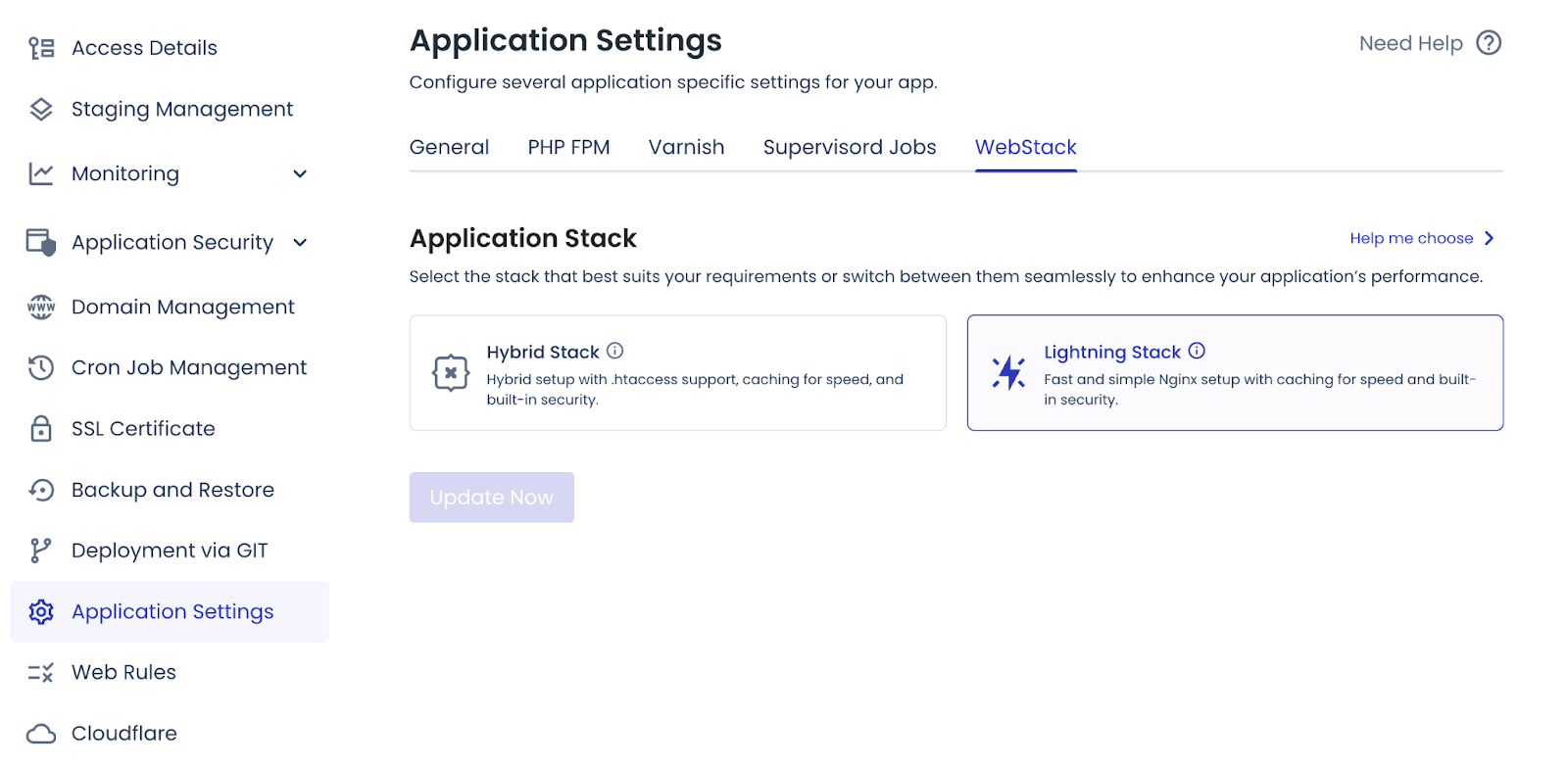
Cloudways offers two application stacks, allowing you to choose the setup that best matches your application’s performance and compatibility requirements.
Hybrid Stack
The Hybrid Stack, previously known as ThunderStack, is designed to deliver speed, efficiency, and flexibility while maintaining full compatibility with Apache-based applications.
In this stack, NGINX handles static assets efficiently, while Apache processes dynamic PHP requests. This combination makes it well-suited for legacy PHP applications that depend on .htaccess rules or Apache-specific functionality.
Lightning Stack
The Lightning Stack is a modern, high-performance architecture built for speed, scalability, and high concurrency.
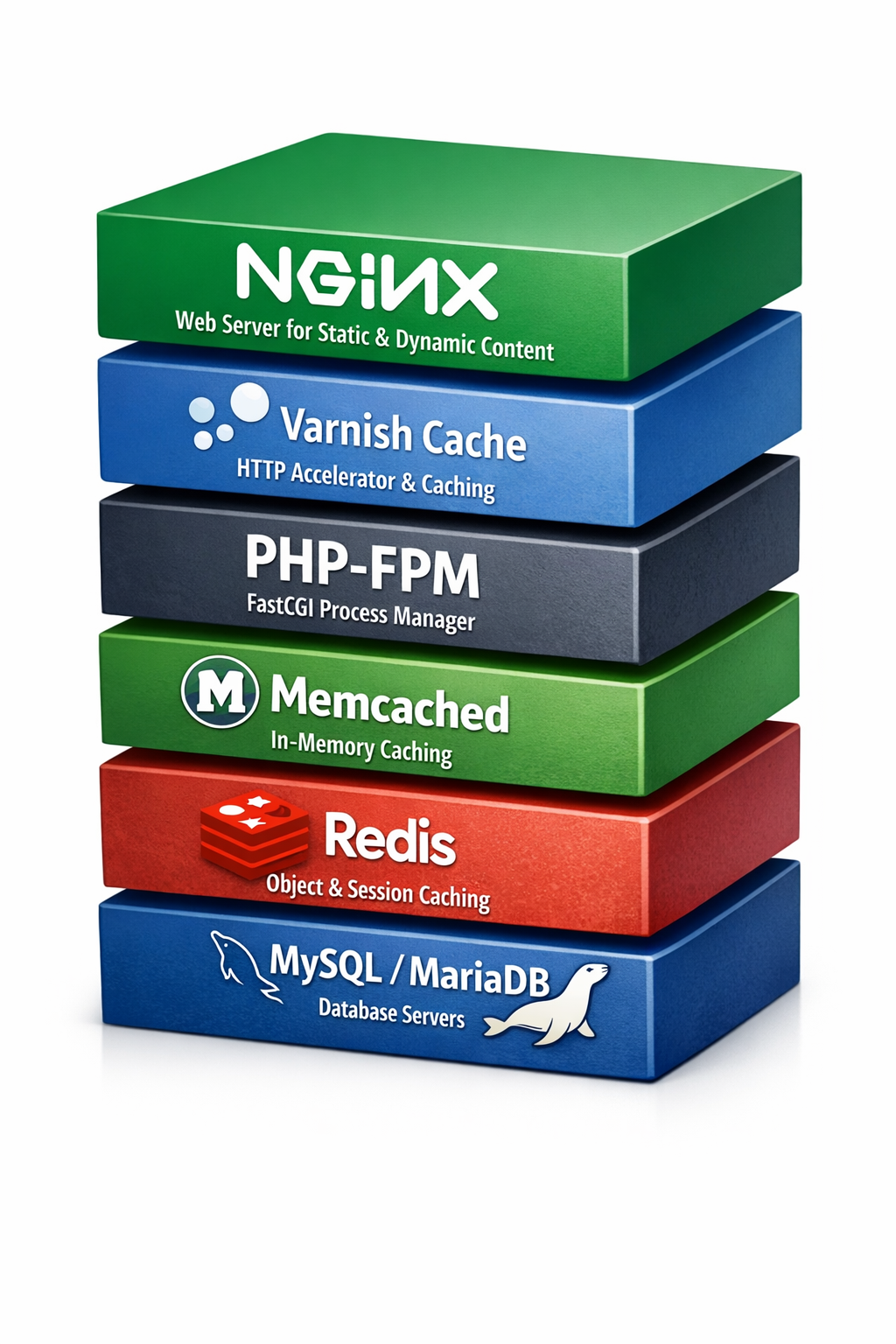
- Cloudways Lightning Stack
The Lightning Stack uses NGINX for both static and dynamic content delivery, Varnish for HTTP caching, and PHP FPM for efficient PHP execution. Memcached and Redis are available for object caching, with MySQL or MariaDB powering the database layer. This stack is optimized for modern PHP applications and high-traffic websites, delivering lightweight, high-performance hosting that scales smoothly as demand grows.
Cloudways Stack vs VPS at a Glance
The following table gives you a quick side-by-side look at how a self-managed VPS compares with Cloudways managed hosting. It’s an easy way to see the differences in features, responsibilities, and performance at a glance.
Cloudways Stack vs VPS Differences
Here’s a closer look at how Cloudways compares to a traditional VPS in real-world hosting scenarios.
Performance
With a traditional VPS, performance depends entirely on how well the server is configured and maintained. While dedicated resources provide stability, achieving high performance requires manual tuning of web servers, caching, PHP, and databases. Without ongoing optimization, performance can decline as traffic grows.
Cloudways is optimized for performance out of the box. Both the Hybrid and Lightning stacks are pre-tuned to handle static and dynamic workloads efficiently. The Lightning Stack, in particular, excels at high-concurrency and dynamic traffic, delivering faster response times with minimal effort, so you can focus on growing your website instead of managing servers.
Scalability
Scaling a traditional VPS is typically manual and can disrupt normal operations. Increasing CPU, RAM, or storage often requires reconfiguration and may involve downtime or service interruptions.
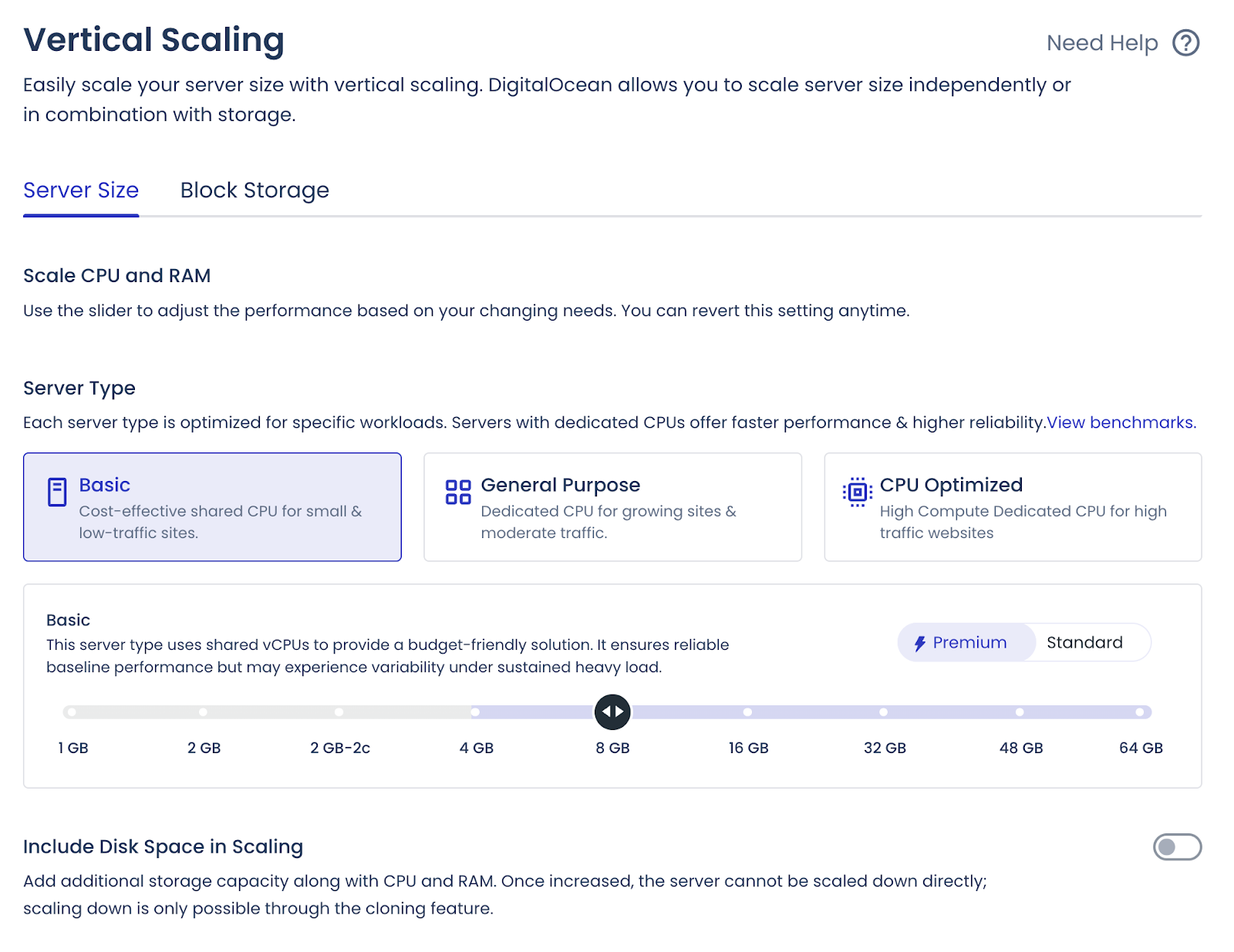
Cloudways offers one-click vertical scaling through its dashboard. Because the stack is cloud-based and fully managed, scaling is faster and more predictable, making it ideal for growing websites and sudden traffic spikes.
Management and Reliability
Traditional VPS management is hands-on. You handle operating system updates, security patches, monitoring, backups, and troubleshooting. While this level of control can be valuable, it also increases operational overhead and demands technical expertise.
The Cloudways stack removes much of this burden through its managed hosting approach. Server provisioning, system updates, performance monitoring, automated backups, and security hardening are built into the platform. This allows teams to concentrate on application development rather than infrastructure management.
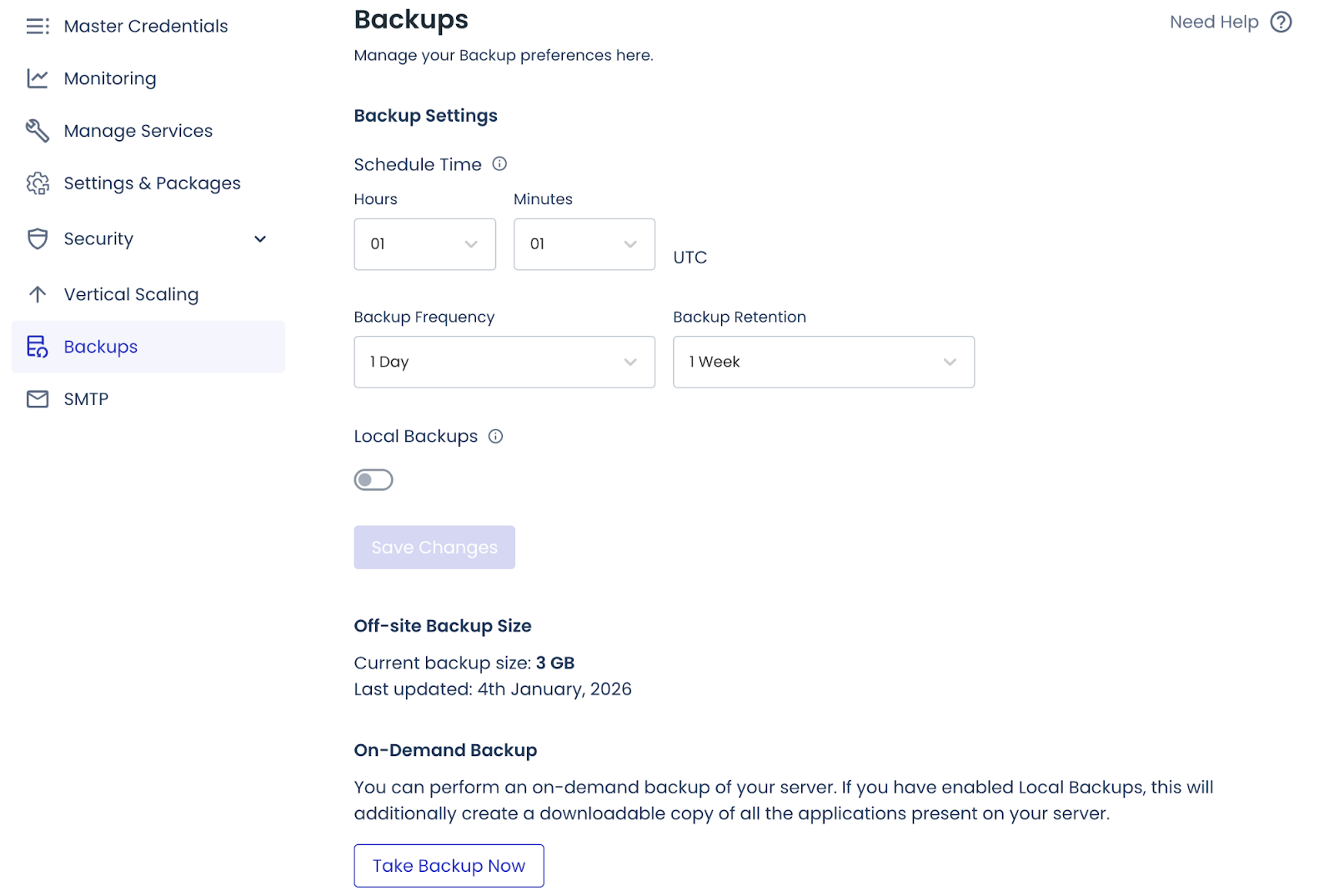
From a reliability perspective, traditional VPS environments rely heavily on manual backup strategies and custom recovery plans. The Cloudways stack enhances reliability by leveraging cloud infrastructure, proactive monitoring, and automated backup systems that can be scheduled, resulting in faster recovery times and more consistent uptime.
Object Caching and Database Management
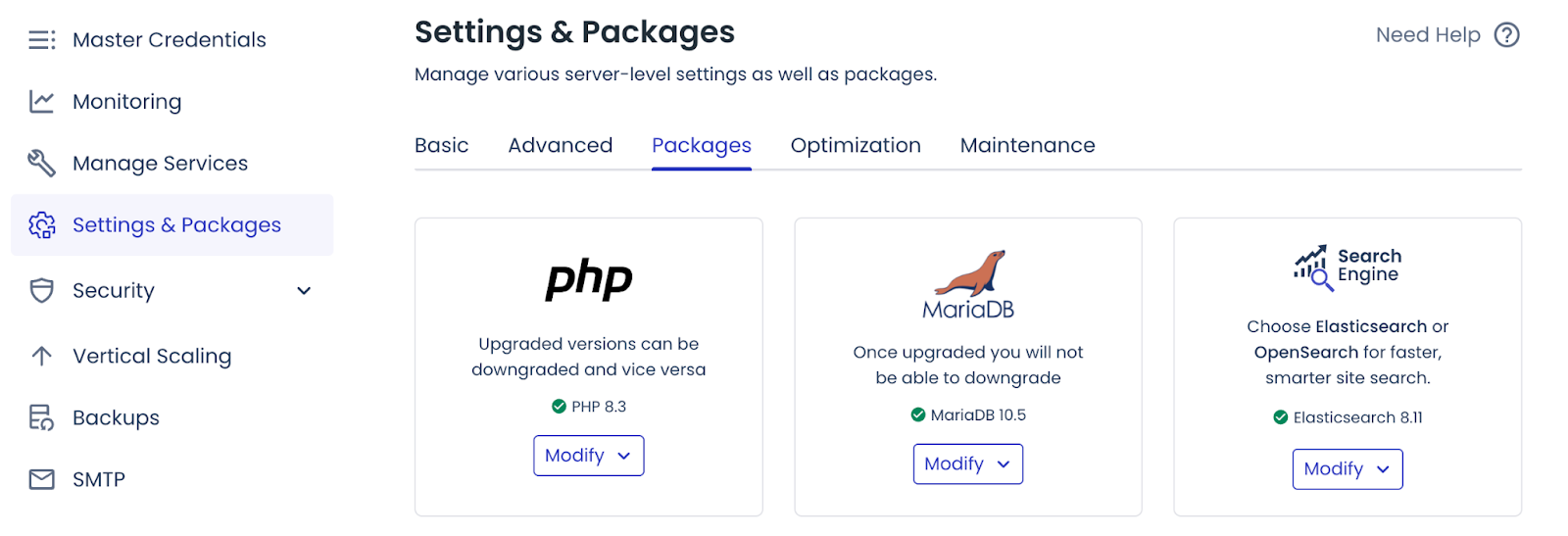
On a traditional VPS, object caching layers such as Redis or Memcached must be installed, configured, and maintained manually. With Cloudways, caching is integrated at the platform level. Memcached is enabled by default, Redis can be activated easily through the platform, and Object Cache Pro is supported for eligible WordPress applications.
Database management follows a similar pattern. On a VPS, installing, tuning, backing up, and updating databases is your responsibility. The Cloudways stack includes pre-installed and optimized MySQL or MariaDB, with automated updates, backups, and performance optimizations handled by the platform.
Security
A traditional VPS gives strong resource isolation, but securing your server is entirely your responsibility. Firewalls, malware protection, system updates, and brute-force prevention all require manual setup, and any lapse can put your site at risk.
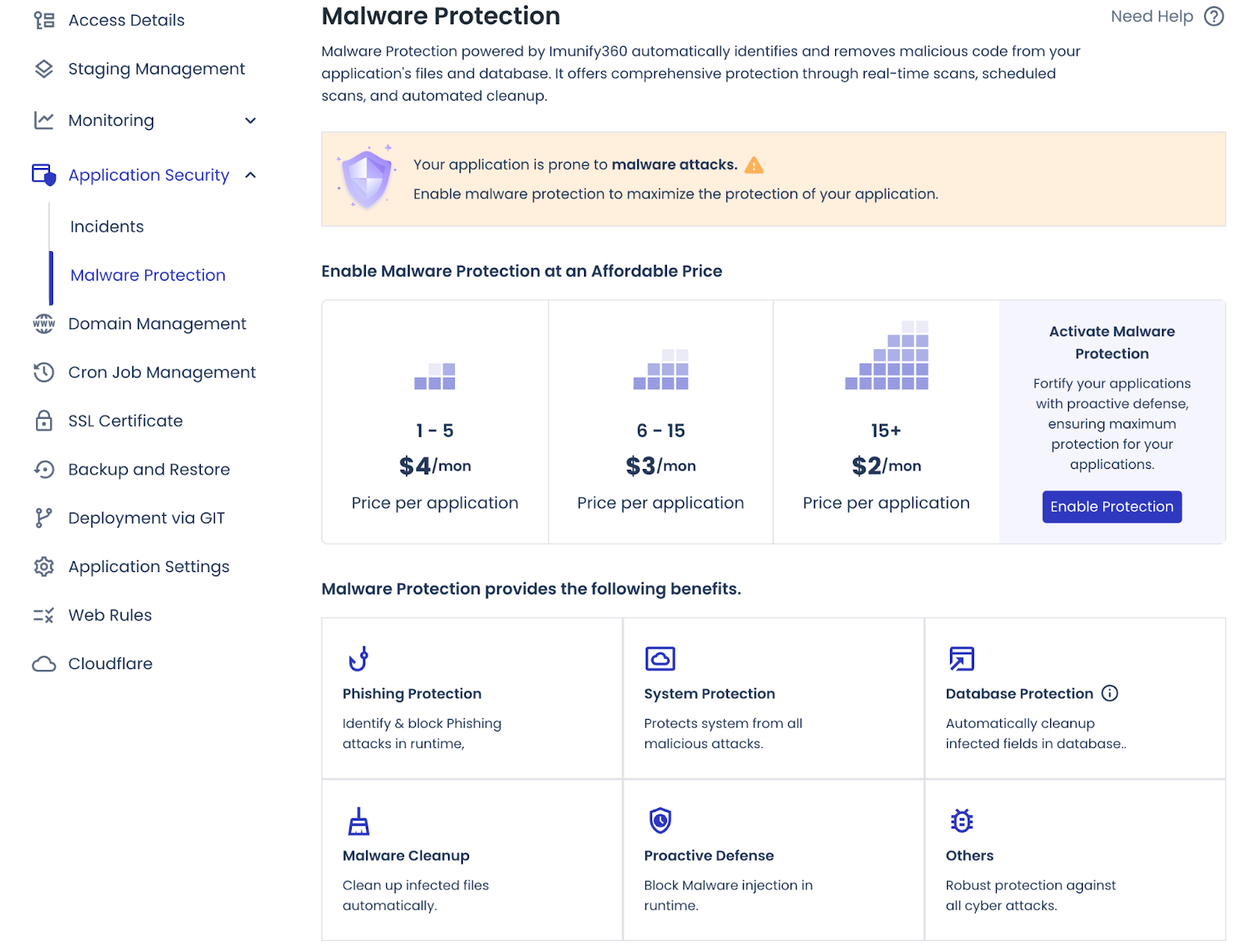
The Cloudways stack includes built-in security features such as Imunify360, automated updates, free SSL certificates, and optional Cloudflare Enterprise integration for DDoS protection and CDN caching. Everything is managed through a single dashboard, keeping your site safe while you focus on growing your business.
Pricing
Traditional VPS hosting often appears cheaper at first, with entry-level plans starting around $4 to $10 a month. You get dedicated resources and full root access, but setup, updates, backups, security, and scaling are all your responsibility. As resource requirements increase, higher-tier VPS plans can exceed $50 a month.
Cloudways follows a pay-as-you-go pricing model, with hourly billing based on the server resources you provision. Plans typically start around $14 a month for a basic server. This pricing includes managed services such as server provisioning, one-click scaling, automated backups, security management, and built-in caching, features that would otherwise require additional tools, time, or expertise on a VPS.
Choosing the Right Hosting Stack
Choosing the right hosting stack depends on what kind of experience you’re looking for and how involved you want to be in the technical side of things. Let’s break it down so you can see which option meets your needs best.
Go with a Traditional VPS if:
- You need full root access and complete control over your server environment.
- You’re running non-PHP workloads or custom configurations that need manual setup.
- You have the technical skills or a dedicated team to handle performance tuning, updates, and maintenance.
Go with the Cloudways Stack if:
- You’d rather focus on your website or business while the platform handles performance optimization for you.
- You don’t want to deal with manual server setup, updates, or security patches.
- You like the idea of scaling easily through a simple, UI-driven panel.
- If your application relies on Apache features or .htaccess rules, the Cloudways Hybrid Stack is the way to go.
- If you're running modern PHP applications, you’ll get the best performance with the Cloudways Lightning Stack.
If the features of lightning stack you can try migrating to Cloudways with the help of expert support engineers to carry out the process seamlessly.
Final Thoughts
When it comes to the "Cloudways vs VPS" choice, it really comes down to how much control you want and how much time you're willing to spend managing your server.
A traditional VPS gives you full access to your setup, which is great if you love getting hands-on with configurations and performance tuning. But it also means you’re responsible for everything, including updates, security patches, scaling, and performance checks as your website grows.
Cloudways takes a different approach. It’s a fully managed platform built for speed, reliability, and simplicity. With high-performance infrastructure, built-in caching, one-click scaling, and strong security baked in, Cloudways keeps your site running fast and stable without the day-to-day server headaches.
So whether you’re running an online store, a growing blog, or multiple client projects, Cloudways lets you focus on what really matters: growing your business, not managing your hosting.
Frequently Asked Questions
1. What is a hosting stack?
A hosting stack is the complete environment that powers a website or application. It includes server resources, infrastructure, and supporting services such as security, backups, and scalability. Together, these elements affect website speed, stability, and how well your site handles traffic.
2. What is a web stack?
A web stack or application stack is the software layer within the hosting stack. It includes the web server, programming language or runtime, database, and caching systems that process requests and deliver content to users.
3. Is cloud hosting better than VPS?
Cloud hosting can be better than a traditional VPS for many websites, especially those that require consistent performance and easy scalability. Cloud hosting is designed to handle traffic changes more efficiently, while a VPS often requires manual scaling and ongoing server management. The right choice depends on how much control and hands-on management you want.
4. What are the disadvantages of VPS hosting?
VPS hosting requires hands-on server management, including setup, updates, security patches, and performance tuning. It can also be harder to scale quickly during traffic spikes, and mistakes in configuration can affect site performance or uptime. For many users, this added responsibility becomes a challenge as their website grows.